Docs
  • Solver
  • Models
    • Field Service Routing
    • Employee Shift Scheduling
    • Pick-up and Delivery Routing
  • Platform
Try models
  • Timefold Solver SNAPSHOT
  • Using Timefold Solver
  • Using Timefold Solver: Overview
  • Edit this Page

Timefold Solver SNAPSHOT

    • Introduction
    • PlanningAI concepts
    • Getting started
      • Overview
      • Embed as a library
        • Hello World Guide
        • Quarkus Guide
        • Spring Boot Guide
      • Run as a service (Preview)
    • Example use cases
      • 🚚 Vehicle Routing (Guide)
      • 🧑‍💼 Employee Scheduling
      • 🛠️ Maintenance Scheduling
      • 📦 Food Packaging
      • 🛒 Order Picking
      • 🏫 School Timetabling
      • 🏭 Facility Location
      • 🎤 Conference Scheduling
      • 🛏️ Bed Allocation
      • 🛫 Flight Crew Scheduling
      • 👥 Meeting Scheduling
      • ✅ Task Assigning
      • 📆 Project Job Scheduling
      • 🏆 Sports League Scheduling
      • 🏅 Tournament Scheduling
    • Using Timefold Solver
      • Using Timefold Solver: Overview
      • Configuring Timefold Solver
      • Modeling planning problems
      • Running Timefold Solver
      • Benchmarking and tweaking
      • Building a service (Preview)
        • REST API
        • Service Model and Enricher
        • Constraint weights (optional)
        • Demo data (optional)
        • Exposing metrics (optional)
    • Constraints and score
      • Constraints and Score: Overview
      • Score calculation
      • Understanding the score
      • Adjusting constraints at runtime
      • Load balancing and fairness
      • Performance tips and tricks
    • Optimization algorithms
      • Optimization Algorithms: Overview
      • Construction heuristics
      • Local search
      • Exhaustive search
      • Neighborhoods: A new way to define custom moves
      • Move Selector reference
    • Responding to change
    • Integration
    • Design patterns
    • FAQ
    • New and noteworthy
    • Upgrading Timefold Solver
      • Upgrading Timefold Solver: Overview
      • Upgrade from Timefold Solver 1.x to 2.x
      • Upgrading from OptaPlanner
      • Backwards compatibility
      • Migration Guides
        • Variable Listeners to Custom Shadow Variables
        • Chained planning variable to planning list variable
    • Plus/Enterprise Editions
      • Installation
      • Performance improvements
      • Score analysis
      • Recommendation API
      • Nearby selection
      • Multithreaded solving
      • Partitioned search
      • Constraint profiling
      • Multistage moves
      • Throttling best solution events

Using Timefold Solver: Overview

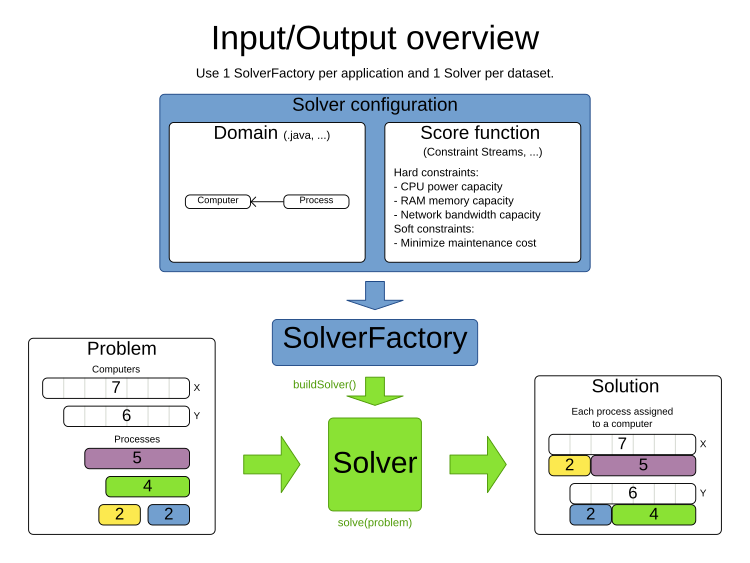
Solving a planning problem with Timefold Solver consists of the following steps:

  1. Model your planning problem as a class annotated with the @PlanningSolution annotation, for example the Timetable class.

  2. Configure a Solver, for example a First Fit and Tabu Search solver for any Timetable instance.

  3. Load a problem data set from your data layer. That is the planning problem.

  4. Solve it with Solver.solve(problem) which returns the best solution found.

inputOutputOverview
  • © 2026 Timefold BV
  • Timefold.ai
  • Documentation
  • Changelog
  • Send feedback
  • Privacy
  • Legal
    • Light mode
    • Dark mode
    • System default